Showing posts with label microsoft. Show all posts

Microsoft to acquire Skype for $8.5 Billion Dollars ..

Wednesday, May 11, 2011

Microsoft buys Skype

Microsoft is going to acquire Skype for $8.5 billion dollars !. Skype which is the world’s leading software enabling users to have voice chat and video calls over internet. This deal means a lot to the future of Microsoft as it will help them to compete with other leading voice chat applications from tech giants like Google, Apple & Yahoo.


Both companies aim to bring new breakthrough in day to day applications. With this deal its guaranteed that we will be able to see Skype as windows component in future Windows version, Windows Mobile, XBOX 360, Microsoft Office integrations and much more. We can also expect to see names like MicroSkype as a windows mobile version of Skype Open-mouthed smile. Lets see what new both of them will bring in and will it be good enough to compete with Google and others..


If you Love Struck loved  my post, then feel free to subscribe to my feed Click here!

How to blog with Microsoft Office Word 2007

Wednesday, October 21, 2009

Microsoft Office 2007 has very smart feature with which you can publish your documents as blog posts or just use it like windows live writer. All you need is Microsoft office 2007 installed on your system. So lets get started with Blogging in Microsoft Word 2007.


These steps will help you in setting up your blog for use with Microsoft Word 2007.


Lets go:


  • Open up Microsoft Word 2007 on your PC.

Click to Enlarge!


  • Now click on the left cornered button with office logo then many options will open.


Click to Enlarge!

  • Select Publish and then choose Blog under this option.


  • Now a Register a Blog account window will appear.


Click to Enlarge!

  • Click on Register now to set up your blog.


  • Select your Blogging platform like Blogger, Wordpress, etc.


Click to Enlarge!

  • For example I am using Blogger as blogging platform and then click on Next.


  • Enter your Username and Password .


Click to Enlarge!

  • Choose a Server for storing your images. If you have a server then enter the upload URL and  source URL otherwise you will have to choose None-Don’t upload pictures. Sometimes blog service providers automatically host images you upload in the post, so contact your Blog service provider for more information.

Click to Enlarge!


  • Click on OK then Word will ask for your confirmation on sending information.


Click to Enlarge!


  • Now choose your blog and you are ready to blog.


If you Love Struck loved  my post, then feel free to subscribe to my post &

get them sent into your Inbox Click here!

How to increase compatibility of Documents created with MS Word

Friday, June 6, 2008

words dreadbob.blogspot.com

This article helps you tackle the compatibility issues of your Microsoft Word Documents. If you send a document made with Newer version of MS Word, then sometimes the reader is not able to access the document in .doc format because of older version of MS Word on his system. So the problem needs to be solved with a more stable & easily accessible format which can be opened by almost most of it's versions.


Which is the Format that beats .doc format in Microsoft Word?


The answer is RTF, also called Rich Text Format. The format can be opened in almost all the versions of Microsoft Word & even in many other Software. In simple language the RTF format is much more stable & better than .doc format.


Saving Files in RTF format:


  • Create a document in MS Word.
  • Then click on 'Save'.
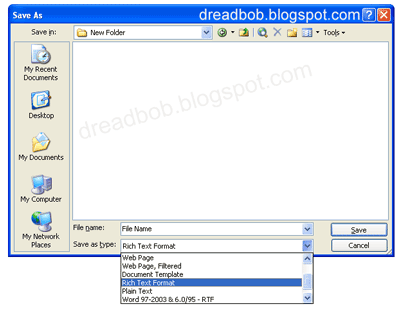
  • After giving name to your file change the File Format by clicking on 'Save as Type'.
  • Then under the drop down menu choose Rich Text Format as the saving format.


Here's the screen shot to help you out:


secret-money-blog-document

Related Posts with Thumbnails


Copyright © Blog Rescue