Showing posts with label copyright. Show all posts

Best assorted ways to prevent copying of your blog material

Sunday, December 27, 2009

How to copyright your Blog! Did you ever thought of saving your blog content from copying by others? then think once more because many thieves out there must be eyeing on you content and using them on their blog under their name.In this way plagiarism kills the credibility of blogger. Though we cannot completely stop others from copying our content but this can be prevented to some extent. In this post you will learn how you can do this, so go ahead.


Below are some tips which will help you in protecting your blog from online thieves:


1. Myfreecopyright.com : I am using this service on my blog and I should say that its working great ! . You Sign-up with them and then enter the URL to be protected (that is your BLOG!). After this whenever you blog they send you the copyrights of the post on your email-id. This makes you the registered writer of the post. They also give you a badge is displayed on your blog to show the visitors that your content is copyrighted


2. Copyscape.com: Copyscape lets you search for the copy of your blog posts on the web. You have to pay if you want to search for more than 10 results by signing up with Copyscape Premium. However they give you free banners to be put up on your blog that prevent others from copying.


3. Use Watermarks : If you are using images on your posts, that are genuinely created by you then you should put up watermark on those images in light color so that they don’t create messy images. The watermark could be in the form of blog address, blog title or your blog logo.


4. All rights reserved: At the bottom of the blog page, write your copyright year followed by blog name and then the message All rights Reserved. This can be seen on most of the professional and popular blogs. This shows that all the content on the blog is copyrighted by you (the author!).


So apply any of these simple 4 tips and save your blogs identity from others.


If you Love Struck loved  my post, then feel free to subscribe to my feed Click here!

How to protect your Blog Content

Saturday, August 9, 2008

imagesEvery blogger has his or her own writing style which he/she wants never to be copied by others. But many out there exploit other peoples content by simply copying the whole matter from others blogs to theirs. This not only affect the SEO of a blog but also the reputation of blog is affected as the copier write their own name in the end & show them as their very own creation.


Although the problem is not solved completely at present but you can follow these tips & can prevent those suckers! Devil from stealing your content :


Copyscape : Copyscape is a web site where you can get badges for your blog that gives warnings to others & can help prevent copying of your blog. You can also search for copies of your web pages at Copyscape & can sue the copier. Moreover the banners can really help you

Page copy protected against web site content infringement by Copyscape

defend your site a lot & make the people prevent & think before copying material from your blog. Here's how the banner looks after installing on your site....


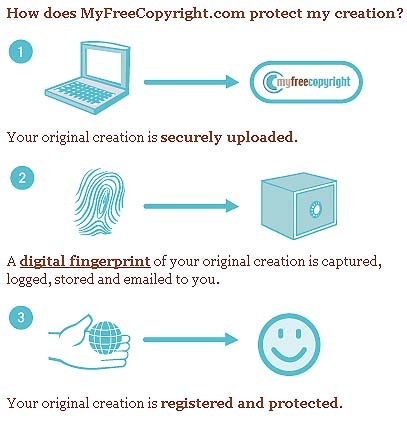
MyFreeCopyright : MyFreeCopyright is very much similar to CopyScape. But I would say that this is more real than the CopyScape as you manually create your account , configure your blog by entering the url & then a badge with unique code is given to you for embedding on your blog. I have one at my blogs footer just like this ; MyFreeCopyright.com Registered & Protected .


Look at the image below which explains the MyFreeCopyright method more clearly :


myfreecopyright


About Page of your Blog can also help you save content of your blog. You can set rights for your blog & can give a do's & dont's list on your Blog.


No Right click Method: This method involves disabling right click on Web Page. All you have to do is add a small code inside body tags of HTML code of your blog. This prevents users from selecting & copying text & images from your Blog. Read More at Hypergurl.com..


Link Back requirement : You can set a simple requirement in about page or at front page of your blog that " users copying anything from this site must give a link back to their site in the end of their copied material " . This line can help you gain popularity & you can get full benefit if someone copies anything from your site.


If you Love Struck loved  my post, then feel free to subscribe to my post &

get them sent into your Inbox Click here!

Related Posts with Thumbnails


Copyright © Blog Rescue