Showing posts with label create. Show all posts

How to create 3D TEXT in Photoshop

Sunday, November 8, 2009

imageI recently learned a great way of making 3D text in Photoshop which i thought was IMPOSSIBLE in Photoshop. In very short time you can create a great looking 3D text which you can use for your blogs and websites.


For this tutorial I am using Photoshop CS3. It can also be created using Photoshop CS2 or Photoshop 7.


Lets start :


    • Open Photoshop


    • Click on New to Create a New file and choose the resolution high like 1600 x 1200px. imageimage


    • Click OK to start creating a new image.


    • Now Click on Text button to begin writing on the image.


    • Now write the first alphabet you want to convert into 3D.image


    • Then right click on S layer and click on Rasterize type.image
    • Now with S layer selected Go to Edit>Transform>Distort . Now Distort the Alphabet from sides to give it a 3D look.image 
    • Right Click on S layer and select Duplicate Layer to create a Duplicate layer of S and name it as S1.

image

    • Now with S1 layer selected go to Edit>Free Transform. Then move the S1 layer 6 to 10 pixels up and 3 to 4 pixels right or left
      image


    • Now right click on S1 layer and select Bending Options. Then select the Gradient Overlay and choose the colours that you want. Set the angle to show the light colour outside or set accordingly.

image

    • Here is the final output TADAAAA!!!!

 image


You can also watch the video tutorial and learn:


To download the Video Tutorial and the PSD file .. Click Here! 


If you Love Struck loved  my post, then feel free to subscribe to my post &

get them sent into your Inbox Click here!

How to create PDF files using Photoshop CS3

Monday, June 9, 2008

pdf


With many new features Adobe Photoshop is promising to be the all in one tool for everyday users. Instead of image editing for web & family photos , working with 3D models & much more the Photoshop has also a GREAT feature of Creating even PDF files!!.


Although PDF files are not created using text files as we do in the Adobe professional, with Photoshop you can only create the files using images.  As we all know the how much the PDF files are stable & are being used today. This can be of very good use if you want to make your own presentations for your business needs.


Creating PDF files using the Adobe Photoshop CS3 is quite easy, just have a look at the following steps :


  • Open Photoshop.
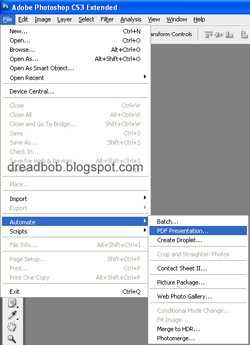
  • Click on 'File', then click on 'Automate'.

file-dreadbob-blogspot-com

                           { Click to Enlarge }


  • Now under automate click on 'PDF presentation'.
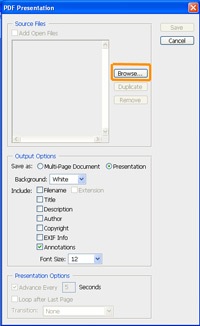
  • Then click on 'Browse'

browse 

                           { Click to Enlarge }


  • Now choose images you want to include in your presentation.
  • Then choose Presentation under Output options in the 'Save As' option.
  • You can choose the background as 'White,Black or Gray'.
  • After that you can choose some options like including filename, title, author, copyright, etc.
  • You can also set Presentation options which include Adding transition effects & looping.
  • Then Click on save.
  • You will also offered options for setting the compatibility of PDF with adobe readers different versions.


In this way your images will be exported into PDF file which serve as a great format for showing up your presentations.


If you like my post, then feel free to subscribe to my post & get them sent into your Inbox .Click here
 

Related Posts with Thumbnails


Copyright © Blog Rescue