Showing posts with label Flash. Show all posts
Showing posts with label Flash. Show all posts

How to add a video to my blog?
Thursday, February 15, 2007
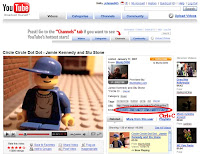 In the upper right hand of the page, next to the video is a box with a link and an embed code.
To embed this video right onto your blog copy the code (Ctrl+C) in this embed box.
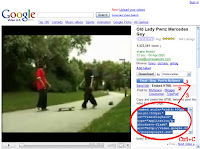 On the right side of the video is a link that says "Email - Blog - Post to MySpace". Click on this link.
When you click that link some more links show up. Click on the one that says "Embed HTML".
If you want to embed this video right onto your blog, copy the code (Ctrl+C) in the embed box.
 Paste the code (Ctrl+V) you saved earlier right into the text area.
Add a video you like to your blog from either Youtube or Google Video.
From Youtube:
 In the upper right hand of the page, next to the video is a box with a link and an embed code.
To embed this video right onto your blog copy the code (Ctrl+C) in this embed box.
From Google Video:
 On the right side of the video is a link that says "Email - Blog - Post to MySpace". Click on this link.
When you click that link some more links show up. Click on the one that says "Embed HTML".
If you want to embed this video right onto your blog, copy the code (Ctrl+C) in the embed box.
Into your Blogger Dashboard:
 Paste the code (Ctrl+V) you saved earlier right into the text area.
Subscribe to:
Posts (Atom)
