We wrote an article some time back suggesting how you can Add Video to Blogs. We highlighted two popular video hosts – Google Video and YouTube. Just yesterday (Aug 24, 2007) Blogger released its new Video Upload feature from its Blogger in Draft. There is now an icon in your Post Editor allowing you to upload a video into your post, in the same manner as you would for photos. At the moment,
Showing posts with label Video. Show all posts
Showing posts with label Video. Show all posts
Faster Web Page Load Time
Friday, July 6, 2007
We share with you what we have been doing to improve the page loading time of our Blog. If a web page takes too long a time to load, the readers will simply hop on to another site. Making it load quickly also saves the dial-up internet users' money and time. While it is true that the download time depends on the readers' internet connection speed, we can as Blog owners tweak our layout and
Shrek the Third
Tuesday, May 8, 2007
Shrek the Third has Shrek and Fiona watching over their kingdom of Far Far Away, now that King Harold is a frog, yet Shrek feels that he never cares about his friends. When King Harold falls ill and is dying, Shrek and Fiona determine that if they can find a suitable heir to the throne of Far Far Away and bring him back, they can leave their current lifestyles behind and return to their swamp. The most promising candidate for the position of king is Fiona's cousin, Arthur (Artie) who proves to be much more of a problem than Shrek, Donkey, and Puss had bargained for...

Add Video Clip to Blog
Saturday, March 17, 2007
Update: Blogger released a new Add Video feature which allows you to upload videos into your Blog posts. Should you want to know more about it, or resize or align the video, or put it into the sidebar, you may follow our guide in Customize Video Upload in Blogger.This is a step-by-step guide on how to add a video or movie clip to your Blog or webpage. There are many sites that offer free video
How to add a video to my blog?
Thursday, February 15, 2007
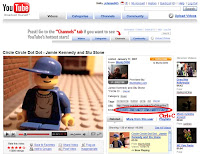 In the upper right hand of the page, next to the video is a box with a link and an embed code.
To embed this video right onto your blog copy the code (Ctrl+C) in this embed box.
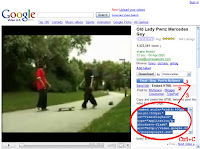 On the right side of the video is a link that says "Email - Blog - Post to MySpace". Click on this link.
When you click that link some more links show up. Click on the one that says "Embed HTML".
If you want to embed this video right onto your blog, copy the code (Ctrl+C) in the embed box.
 Paste the code (Ctrl+V) you saved earlier right into the text area.
Add a video you like to your blog from either Youtube or Google Video.
From Youtube:
 In the upper right hand of the page, next to the video is a box with a link and an embed code.
To embed this video right onto your blog copy the code (Ctrl+C) in this embed box.
From Google Video:
 On the right side of the video is a link that says "Email - Blog - Post to MySpace". Click on this link.
When you click that link some more links show up. Click on the one that says "Embed HTML".
If you want to embed this video right onto your blog, copy the code (Ctrl+C) in the embed box.
Into your Blogger Dashboard:
 Paste the code (Ctrl+V) you saved earlier right into the text area.
Subscribe to:
Posts (Atom)
